Microsoft Teams Rooms installation and MTR systems
Microsoft Teams Rooms (MTR) are meeting rooms fitted with Microsoft-certified equipment (a video bar or camera, microphones, speakers, a touch console and one or two displays) that join a Teams meeting in one touch. A certified room typically costs £3,000 to £8,000 installed for a huddle space, £8,000 to £20,000 for a 6 to 12 person room and £25,000 to £60,000+ for a boardroom. We install them across the UK and keep them running with a managed service.
- Certified Teams Rooms hardware only
- ISO 27001, 9001 and 14001 certified
- Crown Commercial Service supplier
- Managed service with up to 4-hour on-site response
Jump to: what a Teams Room is · MTR devices by room size · cost by room size · Basic vs Pro licence · installation across the UK · managed service
Teams Rooms is one of four platforms we install; the parent guide to video conferencing systems compares them.
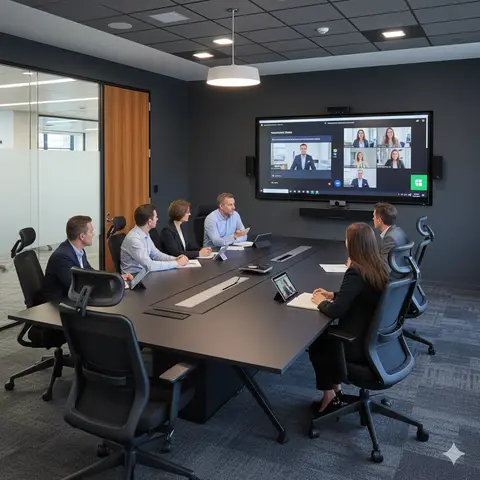
MTR devices and equipment by room size
What a certified Teams meeting room needs depends mostly on how many people sit in it and how far the back row is from the camera. These are the specifications we install most often in the UK; the full certified Teams Rooms hardware list is kept up to date by brand and room size.
| Room | People | Typical certified equipment | Installed cost | Install time |
|---|---|---|---|---|
| Huddle room | 2 to 5 | All-in-one video bar (Logitech Rally Bar Mini, Poly Studio X30, Yealink MeetingBar A20, Neat Bar), touch console, 55" display | £3,000 to £8,000 | 1 day |
| Meeting room | 6 to 12 | Larger bar or PTZ camera (Logitech Rally Bar, Poly Studio X50/X70, Neat Bar Pro), table or ceiling microphones, dual displays | £8,000 to £20,000 | 1 day |
| Boardroom | 12 to 20+ | MTR compute (Lenovo ThinkSmart, Crestron Flex), multi-camera tracking, ceiling microphone arrays, DSP audio (Shure, Biamp, Q-SYS) | £25,000 to £60,000+ | 2 to 4 days |
Costs above exclude the Teams Rooms licence each room needs (see below).
Teams Rooms licence: Basic vs Pro
| Teams Rooms Basic | Teams Rooms Pro | |
|---|---|---|
| Price | Free | About £36 per room per month |
| Rooms per tenant | Up to 25 | Unlimited |
| AI camera features | No | Auto-framing, speaker tracking, front row |
| Pro Management portal | No | Proactive monitoring, fleet firmware, analytics |
Quick reference: Basic free up to 25 rooms; Pro about £36/room/month for AI cameras and central management. Model it over 36 months: the Teams Rooms licence comparison covers UK prices and what each tier includes.
Microsoft Teams Rooms guides
How much does a Microsoft Teams Room cost in the UK?
A Microsoft Teams Room costs £3,000 to £60,000+ supplied and installed in the UK, depending almost entirely on room size. These are the three bands we quote against, excluding the Teams Rooms licence.
| Room size | People | Installed cost (2026) | What drives the price |
|---|---|---|---|
| Huddle room | 2 to 5 | £3,000 to £8,000 | One Android bar, one 55" display, touch console, half a day of cabling |
| Standard meeting room | 6 to 12 | £8,000 to £20,000 | Larger bar or PTZ camera, table or ceiling microphones, dual 65" to 75" displays |
| Boardroom | 12 to 20+ | £25,000 to £60,000+ | Windows MTR compute, multi-camera tracking, ceiling microphone arrays, DSP audio, control and acoustic treatment |
Quick reference: huddle £3k-£8k, standard meeting room £8k-£20k, boardroom £25k-£60k+, plus Basic (free, up to 25 rooms) or Pro (about £36 per room per month). Use the estimator below for a room-by-room figure.
Ballpark your Teams Rooms rollout
Enter how many rooms of each size you need. A free site survey turns this into a fixed price.
4 rooms, supplied and installed
£22,000 to £56,000
plus about £144 a month for Teams Rooms Pro licences
Excludes support contracts and building works. Larger rollouts are phased in waves to keep rooms in use.
Example kits with current hardware prices
Real products and prices from TopAV, our sister company, last updated 23 October 2026.
| Kit | Hardware | Hardware, ex VAT | Installed guide |
|---|---|---|---|
| Huddle room, 2 to 5 peopleAll-in-one video bar with touch console | £2,226 | £3,000 to £8,000 | |
| Small room on Windows, 4 to 6 peopleLogitech MeetUp 2, Tap and Lenovo mini PC, pre-configured |
| £2,808 | £4,000 to £8,000 |
| Meeting room, 6 to 10 peopleLarger video bar with dedicated touch controller |
| £5,349 | £8,000 to £20,000 |
| Large meeting room, 10 to 16 peopleDual-camera system on dual displays |
| £5,898 | £8,000 to £20,000 |
| Boardroom, 16+ peopleTwo PTZ cameras; ceiling microphones and larger displays specified at survey |
| £7,729 | £25,000 to £60,000 |
Hardware only, ex VAT. The installed guide is our typical range for that room type, covering mounts, cabling, configuration, Microsoft 365 enrolment and training. Teams Rooms licensing (Basic free for up to 25 rooms, Pro around £36 per room per month) is extra. Hardware prices move, so your site survey quote is the fixed price.
DESIGN YOUR PERFECTMEETING ROOM
Use our interactive configurator to build your ideal meeting room setup in minutes. Select your room type, size, and purpose to see tailored AV recommendations — from displays and microphones to control and connectivity.
Choosing a Teams Rooms installer: what good looks like
Plenty of suppliers can sell you a video bar. Fewer will leave you with rooms that still work in year three. Hold every bidder to these standards:
- Certified hardware only. Every device on Microsoft's Teams Rooms certified list, so you keep Microsoft support, tested firmware and Pro Management coverage. "Works with Teams" is not the same thing.
- A site survey before the quote. Room dimensions, back-row distance, acoustics, power and network points checked in person, because they decide which bar or camera will actually work.
- Network and licensing planned up front. Resource accounts, Basic or Pro licensing, firewall ports and QoS agreed with your IT team before install day, not discovered on it.
- Information security taken seriously. ISO 27001 certification and a clear process for handling your Microsoft 365 tenant and admin access.
- Handover people can use. Short user training for each room, plus admin documentation so your IT team can manage devices in the Teams Rooms Pro portal.
- A written support SLA. Remote monitoring, firmware management and an on-site response time for critical faults (4 hours is a sensible bar) in the contract.
See our accreditations and how our consultation and design process works.
Trusted AV Partner to Leading Organisations