Coeo – Microsoft Signature Teams Room
One of the first Microsoft Signature Teams Rooms in the UK, delivering exceptional hybrid meeting experiences and reducing travel requirements for client meetings.
AV Refresh
When Microsoft Data and AI solutions company, Coeo acquired its new headquarters in Reading, it appointed Microsoft Office, 365 and Teams specialist Purify Technology to develop a smart workplace and oversee IT and software provision.
The key objective for the client was to reduce the requirement of time-consuming travel to meet face-to-face with prospective clients. As a partner of Microsoft, and with its new offices located on a Microsoft campus, Coeo also wanted to utilise Microsoft Teams technology and was keen to install a Microsoft Signature Teams Room – a brand-new concept at the time of this project. Purify subcontracted Strive AV to specify and install the required AV technology for this specialist workspace.
"We needed to plan strategically to ensure this project was at the forefront of Microsoft technology. As a result, Coeo is one the first companies in the UK to have a Signature Teams Room." explains Dave Prior-Jones, Co-founder and MD of Purify Technology. "It's a fully inclusive teams experience, so participants can just enter the room and press 'Play' to begin. It's that simple. The meticulous design process resulted in a successful integration with which the client was very pleased."
Project Brief
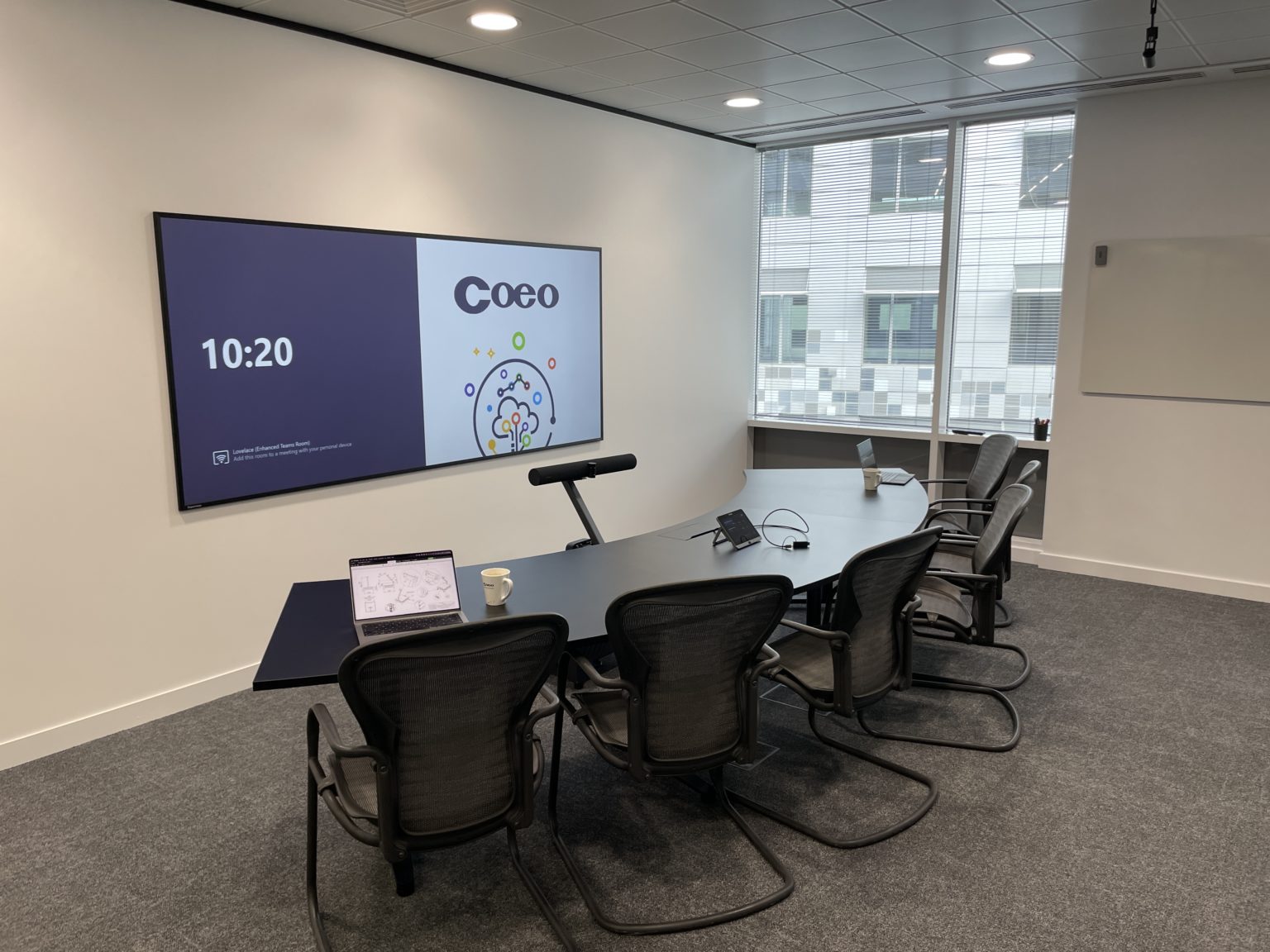
As per the client brief, the Microsoft Signature Teams Room acts as a 'Digital Reception' for prospective customers, providing a striking first impression of Coeo and an exceptional hybrid meeting experience. The company uses the room to conduct high-quality remote introductions and demonstrate Coeo's Microsoft credentials. This has helped to win new business and save valuable time and travel expense.
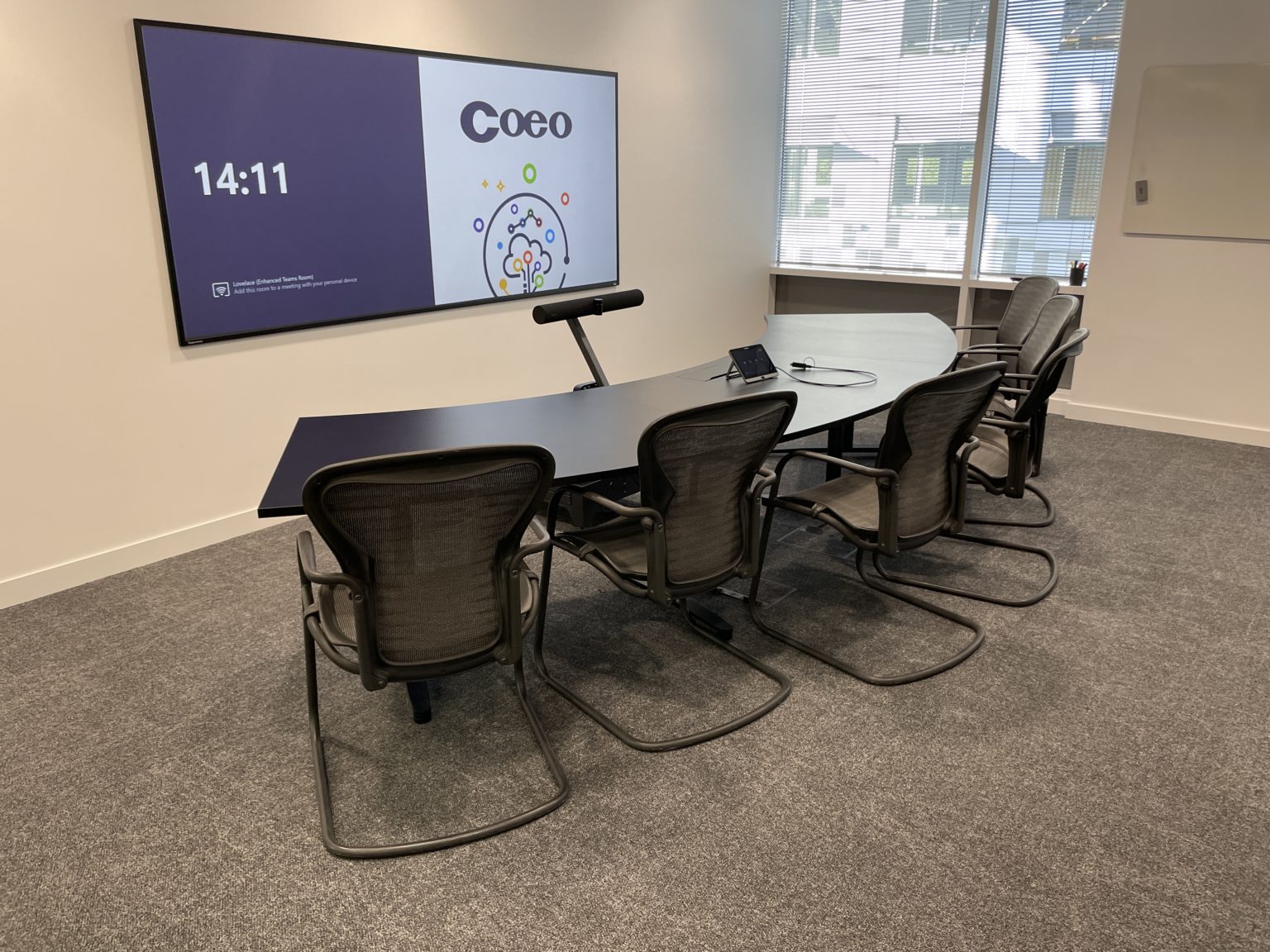
In a break from the traditional meeting room, the screen is positioned on the longer wall of the Microsoft Signature Team Room. In-room participants sit along a fixed front-facing, curved table and are positioned face to face with remote participants on screen, as opposed to the traditional side-on view set-up used in most meeting rooms.
The Solution
Working closely with the Purify team, Strive AV specified audio visual products that would work effectively with layout of the room and operate seamlessly with the requirements of Microsoft Teams Front Row software.
"The Microsoft Signature Teams Room is set-up to provide an enhanced meeting experience for six participants, with an ultra-wide 21:9 screen which supports Microsoft Front Row collaboration software. To achieve this aspect ratio, we specified an ultra-short-throw (UST) Epson Pro Laser Projector which was positioned in close range on the floor and a dnp Supernova One 21:9 projection screen." Explains Toni Moss, Managing Director at Strive AV.
A Jabra PanaCast 50 integrated camera and microphone sits at eye level, between the meeting table and screen. This positioning ensures each individual is picked up equally by the camera and microphone when they are speaking, so every participant feels like they're part of the meeting.
To reduce echo and enhance sound quality, the walls are fitted with sound-proofing panels. A Coeo-branded living foliage wall, which is strategically situated in the background behind in-person participants, also helps to reduce echo as well as providing an attractive and welcoming view for remote joiners. The living wall and office furniture are all carefully positioned in line with the Microsoft Teams Room 'view'.
Microsoft Front Row
Ultra-wide 21:9 screen supporting Microsoft Front Row collaboration software for enhanced meeting experiences.
Jabra PanaCast 50
Integrated camera and microphone at eye level ensuring equal pickup for all participants.
Optimised Acoustics
Sound-proofing panels and living foliage wall reduce echo and enhance sound quality.
Equipment Installed
Project Outcome
The Microsoft Signature Teams Room delivers an impressive first impression of Coeo to new clients and has effectively reduced the requirement to travel for initial business pitches. A combination of thoughtful design elements, IT excellence and AV technologies have brought the room to life, exactly how the client wanted it.
Business Benefits
- Reduced travel requirements for client meetings
- Impressive first impression for prospective customers
- Helped win new business through enhanced presentations
- Demonstrates Coeo's Microsoft credentials effectively
Technical Excellence
- One of the first Microsoft Signature Teams Rooms in the UK
- Ultra-wide 21:9 screen with Microsoft Front Row software
- Face-to-face meeting experience with front-facing curved table
- Optimised acoustics with sound-proofing and living wall
Project Gallery
Microsoft Teams Rooms Signature Series: What It Actually Is
Microsoft Teams Rooms is a broad programme covering everything from a huddle space to a boardroom. The Signature Series sits at the top of that programme, with a defined room layout, an approved hardware list and Microsoft Front Row as the on-screen experience. It is not a marketing label an integrator applies; it is a certification a room either meets or does not.
Standard MTR vs Signature
A standard Teams Room is a certified compute, camera and audio bar driving a 16:9 display. A Signature room uses a 21:9 ultra-wide display, a curved front-facing table, and Microsoft Front Row, which places remote participants at eye level along the bottom of the screen with chat and content above. The layout is prescribed, not preferred.
Why these rooms are non-trivial
A 21:9 panel at the right size means either a very large LED video wall or an ultra-short-throw projector with a matched screen, like the dnp Supernova One we used for Coeo. Camera and microphone placement has to put every in-room participant in frame without depth distortion, and acoustic treatment has to suit a long, narrow room with a hard surface behind the camera.
The approved kit list
Microsoft publishes the Teams Rooms certified devices catalogue, and Signature rooms draw from a subset: certified compute such as the Yealink MVC400 (MCore plus MTouch) or Logitech Tap with a certified MTR PC, certified intelligent cameras such as the Jabra PanaCast 50, and approved displays or projection systems. Substitutions break the certification.
Further reading
Our Microsoft Teams Rooms page covers the wider MTR product family, the Microsoft solutions page sets out our Microsoft credentials, and the Teams Rooms versus Zoom Rooms FAQ explains where the two platforms diverge on certification and licensing.
Delivering a Signature room starts with a site survey that checks throw distance, ceiling height, lighting and the wall the camera is pointed at, before any hardware is specified. As Microsoft partners we run the design against the current certification requirements, manage the build with a single point of contact, and hand the room over with documented commissioning and an ongoing support agreement.
Trusted AV Partner to Leading Organisations













Start your project
Speak to our design team today to discuss your next AV project. We'll guide you through every step - from consultation to completion.