Updated October 2026. This article explains the difference between the Microsoft Teams app and a Microsoft Teams Room. If you are planning, pricing or supporting rooms, the main guide is our Microsoft Teams Rooms page, which covers MTR devices by room size, installed costs from £3,000 to £60,000+, installation across the UK and the managed service.
Microsoft Teams Rooms (MTR) is certified meeting room hardware that runs the Microsoft Teams meeting experience natively, with single-touch join, room-grade cameras, speakers and microphones, and a console for in-room control. It is not the Microsoft Teams app you run on a laptop, it is a dedicated room system. Below is how Microsoft Teams Rooms differs from the standard Microsoft Teams application, what is included, and when each one fits.
What is Microsoft Teams?
Microsoft Teams is a chat-based collaboration platform that allows users to share files, conduct video meetings, and collaborate on projects. It is designed for desktop and mobile devices and is available as a standalone application or as part of the Microsoft Office 365 suite. Microsoft Teams is a popular choice for businesses of all sizes because it allows users to work together in real-time, no matter where they are.
What is Microsoft Teams Rooms?
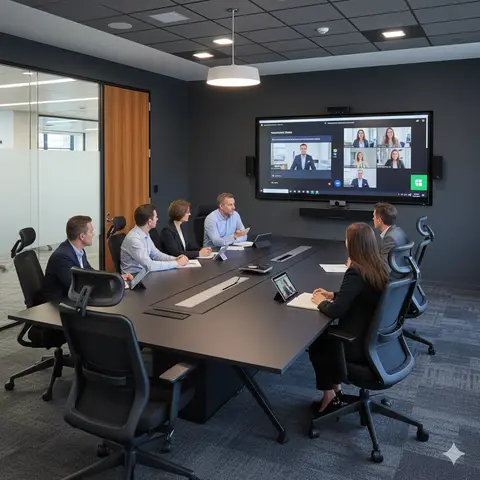
Microsoft Teams Rooms, on the other hand, is a meeting room solution that is designed to work with Microsoft Teams. It is essentially a hardware device that can be used to transform any meeting space into a Teams-enabled video conferencing room. Microsoft Teams Rooms is ideal for businesses that need to host large-scale video meetings and presentations, and it comes equipped with a range of features to help users get the most out of their meetings.
Key Differences
Usage Patterns
One of the most significant differences between Microsoft Teams and Microsoft Teams Rooms is the way they are used. Microsoft Teams is primarily used for collaboration, while Microsoft Teams Rooms is designed for video conferencing. Microsoft Teams can be used by individuals and teams to share files, collaborate on documents, and communicate with one another in real-time. On the other hand, Microsoft Teams Rooms is designed for use in a meeting room setting, where it can be used to conduct video meetings, share presentations, and collaborate with remote team members.
Pricing Models
Another significant difference between Microsoft Teams and Microsoft Teams Rooms is the way they are priced. Microsoft Teams is available as part of the Microsoft Office 365 suite, which is priced on a per-user basis. This means that businesses can purchase licenses for each user and pay a set fee for each license. Microsoft Teams Rooms, on the other hand, is priced on a per-room basis. This means that businesses can purchase a license for each meeting room and pay a set fee for each room.
Features and Capabilities
Microsoft Teams and Microsoft Teams Rooms also differ in terms of the features they offer. Microsoft Teams offers a range of collaboration tools, including real-time messaging, video conferencing, screen sharing, and file sharing. Microsoft Teams Rooms, on the other hand, is designed specifically for use in a meeting room setting, and it comes equipped with features like high-quality video and audio, multiple camera support, and screen sharing.
Hardware Requirements
Another difference between Microsoft Teams and Microsoft Teams Rooms is the hardware that is required to use them. Microsoft Teams can be used on any desktop or mobile device, and it can be accessed via the web or through a standalone application. Microsoft Teams Rooms, on the other hand, requires specialised hardware, including a computer, camera, microphone, and speakers, in order to function properly. This means that businesses that want to use Microsoft Teams Rooms will need to invest in additional hardware, which can add to the overall cost of the solution.
Strive AV installs certified Teams Rooms hardware from Crestron, Yealink, Logitech, Poly, Neat and Cisco; the current certified Teams Rooms hardware list by brand and room size is kept up to date, and the Microsoft Teams Rooms page explains installation and managed support.
Frequently Asked Questions
Q.Is Microsoft Teams Rooms free?
No. Microsoft Teams Rooms requires a per-room subscription licence, either Teams Rooms Basic (free for a limited feature set) or Teams Rooms Pro (paid, with management, intelligent cameras, and advanced features). The certified room hardware itself is also a separate purchase.
Q.What's the difference between Teams Rooms Basic and Teams Rooms Pro?
Teams Rooms Basic gives you core meeting functionality on certified hardware, free for up to 25 rooms. Teams Rooms Pro adds AI camera framing, intelligent speakers, advanced management and analytics, single sign-in, and proactive monitoring for about £36 per room per month. Most organisations with more than a handful of rooms move to Pro; the Teams Rooms Pro licence comparison sets out the UK price and what it includes.
Q.What hardware do I need for a Microsoft Teams Room?
A Teams Rooms-certified compute device, a console (touch controller), a display or two, a certified camera, and a certified microphone/speaker. Strive specifies and installs the right combination for the room size.
Q.Can I use my laptop and Microsoft Teams in a meeting room instead?
You can, but you lose one-touch join, room calendar integration, intelligent cameras, content cameras, and centralised management. For any room used more than occasionally, MTR is the better long-term option.
Q.How long does a Teams Rooms installation take?
A huddle room or standard meeting room is installed and commissioned in one day, and a boardroom in 2 to 4 days. Multi-room rollouts run in regional waves; see Microsoft Teams Rooms installation across the UK.